Skip to content

Asterra Gold / TradingView indicator

THE NUMBERS.UP FRONT.

See the account results. Explore the tool. Asterra Gold puts buy, sell and take-profit markers on your gold chart—so the display stays focused and the decisions stay yours.

TradingView chart analysis. No automatic order placement.
Trading involves risk. Read the product & risk information.

MyfxbookACCOUNT SNAPSHOT
26 SEP – 02 OCT 2026

Asterra Gold account

Record #12238800 · Chart through 2 October 2026

+576.41%Gain in the account snapshot
Profit
$864.62
Drawdown
9.44%
Balance
$1,014.62
Deposits
$150.00
View Myfxbook results

Historical account figures, separate from the indicator preview. Not a live feed or a forecast. Results & risk details.
More Myfxbook snapshot figures · 26 Sep–02 Oct 2026
Equity
$1,014.62 (100%)
Withdrawals
$0.00
Absolute gain
+576.41%
Highest (Oct 02)
$1,014.62
Daily figure shown
31.40%
Monthly figure shown
576.41%
Interest
$0.00
Record
#12238800

The figures are from the supplied account snapshot. Daily and monthly figures are not promised recurring returns. Use the Myfxbook source link to review the available account history and latest information.

The tool / On your TradingView chart

LESS CHART CLUTTER.
MORE CLARITY.

One gold-focused display. Distinct markers. No need to search through a crowded chart to identify Asterra’s labels.

01 / DIRECTIONBUY

Spot the buy markers.

Clearly labeled buy markers stand out against the price chart. Bring them into your own gold-chart analysis.

02 / DIRECTIONSELL

See the sell markers.

Distinct sell labels keep the displayed directions visually separate. The indicator does not place orders for you.

03 / TARGETSTP

Keep targets in view.

Take-profit markers add chart-based reference points. Use the display alongside your own trading plan.

ASTERRA GOLDTradingView · XAUUSD · Chart display
View full chart
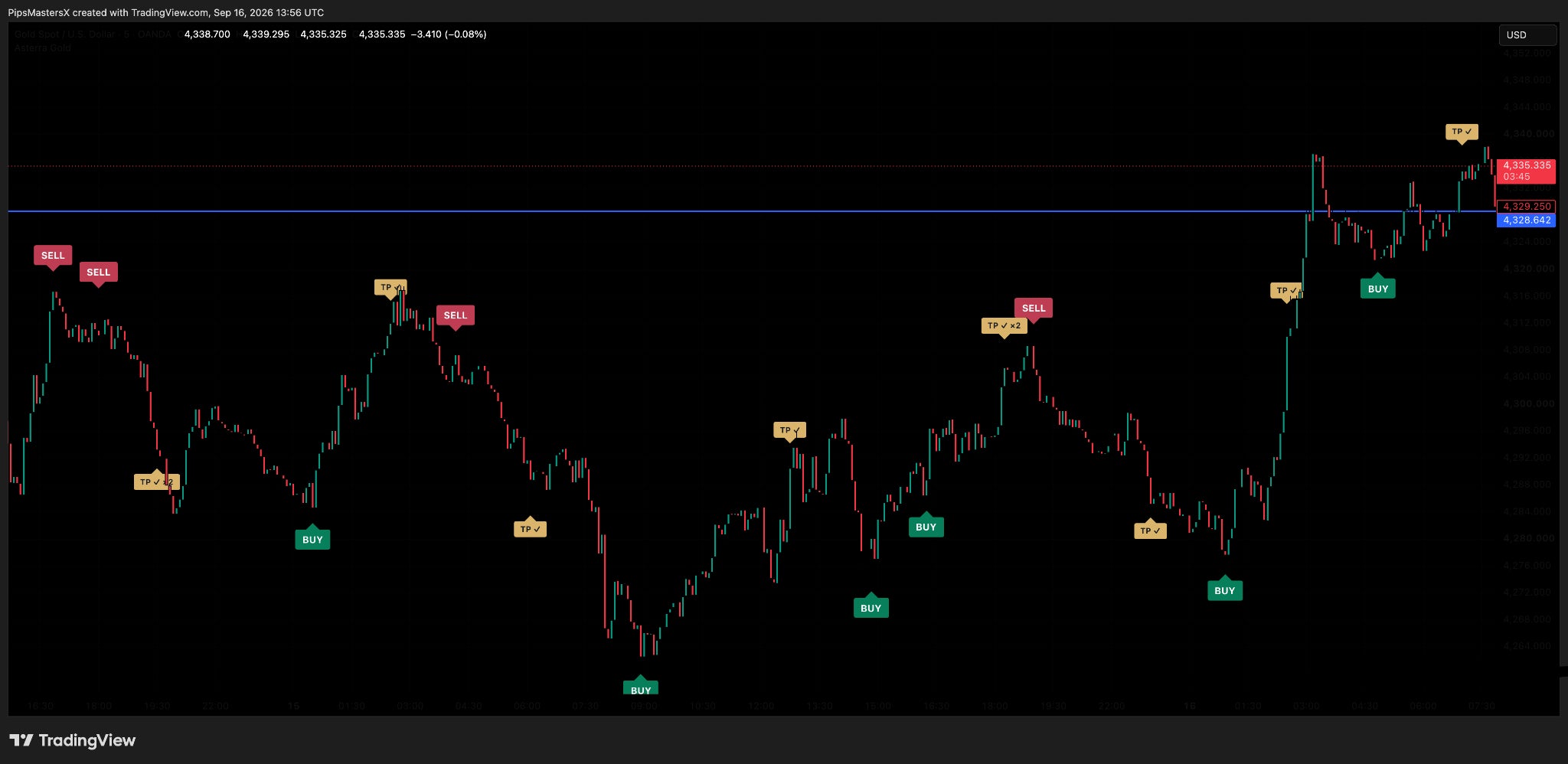
Asterra Gold TradingView chart with BUY, SELL and TP markers. Repainted, filtered history with losing signals hidden.
BUYSELLTP
Chart analysis · Manual decisions

The indicator shows the markers. You make the decisions.
A focused TradingView display—not an automated trading robot.

Get indicator access

Your next move

START WITH FREE ALERTS.
OR GET THE INDICATOR.

Two clear ways to explore Asterra. Follow the free alerts channel, or get the indicator for your own TradingView charts.

01 / FOLLOW THE ALERTSFREE ALERTS

Start here.
No indicator purchase.

Open the free indicator alerts channel. Keep paid TradingView indicator access as a separate decision.

  • Free indicator alerts channel
  • Direct channel access through the invitation link
  • A separate option from the paid indicator
Get Free Indicator AlertsChannel entry does not activate the paid TradingView indicator.
02 / USE THE TOOLTRADINGVIEW

Put Asterra
on your gold chart.

Get indicator access through Whop and bring Asterra’s displayed buy, sell and TP markers into your chart-analysis routine.

  • Asterra Gold TradingView indicator access
  • Distinct buy and sell chart markers
  • Take-profit markers in a gold-focused display
  • Activation and setup questions handled by Asterra support
Get the indicatorReview the price, access duration and applicable terms at checkout.

Have a question before you start? Ask about access or setup.

@pipsmasterxhelp

From access to your chart

GET SET UP.
STAY IN CONTROL.

  1. STEP 01

    Review your access.

    Open Whop to confirm the current price, access duration and terms before purchasing. Ask support any activation questions.

  2. STEP 02

    Add the indicator.

    Follow the supplied activation and setup instructions to add Asterra Gold to your TradingView gold chart.

  3. STEP 03

    Make it part of your analysis.

    Review the markers with your own trading plan. The indicator displays chart references; you remain responsible for trading decisions.

Before you get started

THE ESSENTIALS.
ANSWERED.

Does the indicator trade automatically?

No. This page is for the Asterra Gold TradingView indicator, not the MetaTrader EA. The indicator displays chart markers; it does not open, close or manage positions for you.

How do I get indicator access?

Use the Get indicator button to open the Whop checkout. Review the price, access duration and applicable terms before paying. Contact @pipsmasterxhelp for activation help. Opening the free alerts invitation does not itself purchase or activate the indicator.

The next step is yours

YOU’VE SEEN THE NUMBERS.
NOW EXPLORE ASTERRA.

Review the account record, choose your access, and bring a clearer display to your gold-chart routine.

Risk & product information

Asterra Gold is a chart-analysis indicator. It is not a broker, an investment account, automated trade execution or personalized investment advice. Trading carries the risk of loss, including loss of your deposit. No profit, accuracy level or trade frequency is guaranteed. The supplied chart shows repainted, filtered history with losing signals hidden and is not a complete signal or trading-performance record. The Myfxbook figures are a static screenshot-based account snapshot, not a live feed. The linked account is separate from the chart example; an indicator-only connection has not been verified. Past results do not guarantee future outcomes. Platform access, broker terms and local requirements may apply. Asterra is not affiliated with or endorsed by TradingView, Myfxbook, Telegram, Whop or Meta.

Ask a question

Asterra Gold · TradingView chart display

Enlarged Asterra TradingView chart. Repainted, filtered history with losing signals hidden.

Repainted, filtered history with losing signals hidden—not a complete signal or trading-performance record. Use Zoom in, then scroll or swipe to inspect the chart.